SM HEALTH PRO: Wrist-centred health and watch control for Android
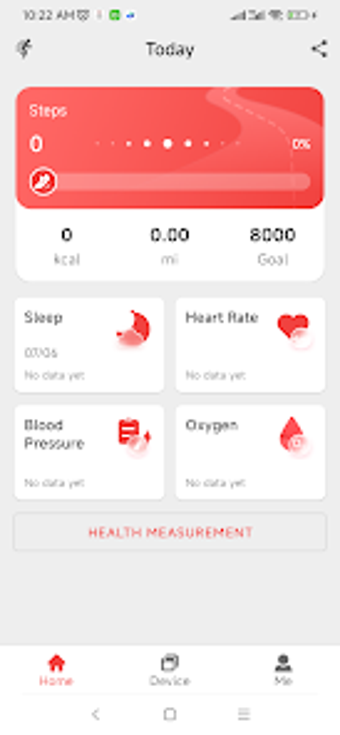
SM HEALTH PRO, from Swiss Military, is a companion app that links a wrist device to a phone for everyday health monitoring and notification routing. It syncs activity and vitals in near real time, surfaces sleep patterns, and sends phone alerts to the watch. The app also offers watch-face choices and periodic reminders, aimed at people who use Swiss Military watches and want consolidated wrist control during daily routines.
Acts as the official bridge between watch and mobile
The app centralizes device management by pairing the wearable and the phone so settings and readings are accessible in one place. The developer's official integration is designed to keep connectivity stable and maintain accurate syncing between watch and mobile, which helps avoid juggling multiple companion tools when adjusting brightness, vibration intensity, or 'Do Not Disturb' modes.
How pairing and permissions shape the setup process
Pairing depends on local connectivity and explicit permissions. The app uses Bluetooth and requests Location for device discovery, plus Contacts, Call Logs and SMS to forward notifications. It also needs background activity access to maintain a steady connection. These requirements make initial setup more involved than a simple tracker but allow the watch to mirror phone activity reliably once configured.
Where it supports everyday routines and hands-free interactions
Practical daily value appears when you want quick wrist access. The app funnels phone alerts such as incoming calls and messages to the watch and provides activity reminders and hydration nudges so users can react without pulling out a phone. Custom dials and watch faces give visual variety on the wrist, while the dashboard groups recent measurements for glanceable checks during a commute or work break.
Privacy posture, accuracy expectations, and reception
The app targets wellness tracking, not clinical diagnosis. It explicitly notes it is for general fitness use only and requires the listed permissions to operate. User feedback highlights the importance of granting background access for consistent syncing, and the app's download figures show broad adoption among Swiss Military watch users, which suggests stable mainstream performance for routine health monitoring.
To sum up, a practical companion for watch owners with modest clinical needs
To sum up, the app is a sensible option for people with Swiss Military watches who want consolidated wrist control and routine wellness summaries; it is not intended for medical diagnosis. One practical consideration is that the phone must run Android 5.0 or later, so check your device software before attempting to pair the watch and phone.
Pros
Official integration preserves steady syncing with Swiss Military watches
Forwards calls, SMS, and social alerts to the wrist for hands-free handling
Offers sleep visualizations and periodic activity reminders
Lets users adjust brightness, vibration, and Do Not Disturb from the phone
Cons
Requires multiple permissions including Contacts, Call Logs, and SMS
Depends on background activity access for consistent syncing
Intended for wellness only, not for medical diagnosis
Loading…
About permissions
Before downloading, you can take a quick look at the permissions this app may request on your device. App permissions allow certain features to work properly, such as accessing your camera to take photos, your location for maps, or your storage to save files.
In this section, you’ll find a clear and simple overview of the types of permissions the app uses, grouped by their level of sensitivity, along with a visual breakdown to help you understand them at a glance. This way, you can see how the app interacts with your device and decide to download with confidence.
Permissions types
Standard
27%
Non-standard
20%
Sensitive
54%
Permissions distribution
Privacy
24%
Data collected
44%
Data shared
32%
Data safety info
Privacy
10 permissions
Permissions that allow the app to access personal or sensitive information stored on your device, such as location, contacts, camera, or microphone.
This report summarises the permissions declared by the app at the time of scanning and groups them into Privacy, Data collected and Data shared. A declared permission shows what the app can access, it does not necessarily mean personal data is collected or transmitted. For full details check the app’s privacy policy and the developer’s clarifications shown below. Softonic generates this report automatically from the package metadata; it is informational and not a substitute for a full security or privacy audit.
Laws concerning the use of this software vary from country to country. We do not encourage or condone the use of this program if it is in violation of these laws. Softonic may receive a referral fee if you click or buy any of the products featured here.